




Video controller
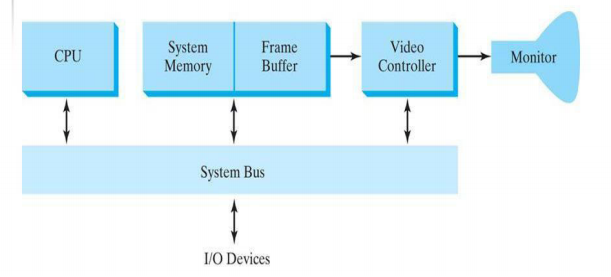
A video controller is a key hardware component in a computer or multimedia system responsible for managing the display of images, graphics, and videos on a screen. It acts as an interface between the CPU (Central Processing Unit) and the display device such as a monitor, projector, or VR headset. Often integrated into a graphics card or the motherboard, the video controller determines the quality, speed, and resolution of visual output.
Functions of a Video Controller
-
Image Processing – Converts digital data from the CPU into visual signals that can be displayed on the screen.
-
Resolution & Colour Management – Supports different resolutions and colour depths for high-quality images.
-
Frame Buffer Management – Stores image data temporarily for smooth and continuous display.
-
Signal Conversion – Converts digital signals into analog (VGA) or digital (HDMI, DisplayPort) formats for various display devices.
-
Refresh Rate Control – Maintains smooth motion by controlling how often the display updates per second.
Types of Video Controllers
-
Integrated Video Controllers – Built into the motherboard or CPU; suitable for general computing tasks.
-
Dedicated Video Controllers – Standalone graphics cards with higher processing power for gaming, design, and video editing.
Advantages of a Video Controller
-
Enhanced Display Quality with sharper images and vibrant colours.
-
Faster Rendering for smoother graphics and videos.
-
Support for Multiple Displays for improved multitasking.
-
Reduced CPU Load by handling graphics-related processing.
-
Hardware Acceleration for video playback and 3D rendering.
Applications of Video Controllers
-
Gaming – High FPS and detailed graphics rendering.
-
Graphic Design & Animation – Precision visuals for professional workflows.
-
Video Streaming & Editing – Smooth playback and high-resolution rendering.
-
Business Presentations – Clear, high-quality visuals on projectors and large screens.